
Batch convert Apple Pages, Numbers, Keynote
to Microsoft Office™ and PDF™ files with Docxtor 2
Convert Apple Pages, Numbers and Keynote documents on-device
Docxtor assists you with batch converting literally thousands of Apple Pages, Number and Keynote documents to Microsoft Office formats (.docx, .xlsx and .pptx) and Acrobat PDF file format. It respects your privacy - all documents remain on your machine during the conversion. Rebuild complete folder structures and copy non-convertible documents like images etc. to the target folder.
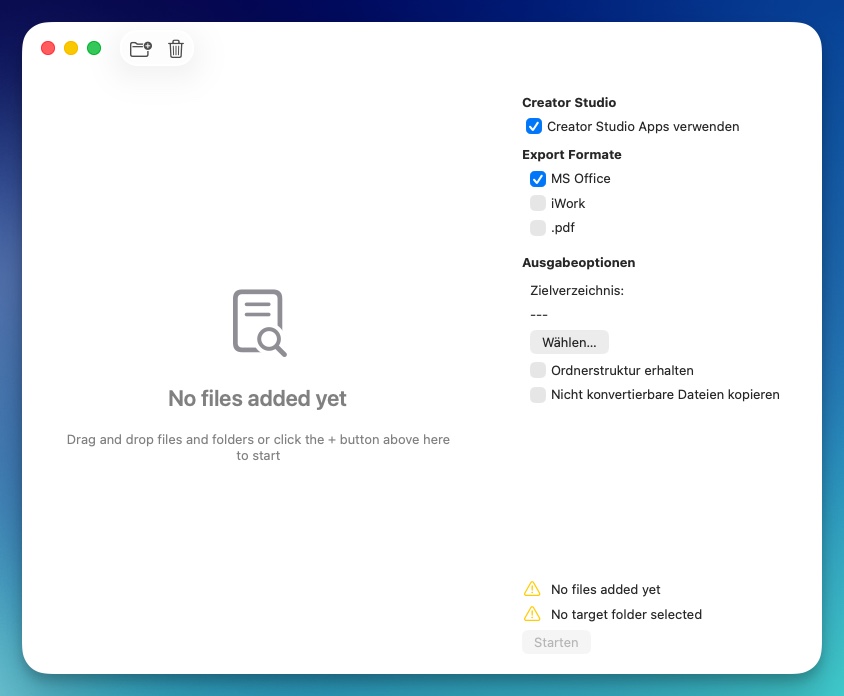
How can I convert my Apple Pages, Numbers and Keynote documents with Docxtor?

The process to convert your documents from Apple file formats is really simple:
- Drag your folders and documents into the main window
- Select conversion options and target folder
- Press Start and watch as the conversion proceeds
See below which document types can be converted:
| Apple | Microsoft Office™ | |||||
|---|---|---|---|---|---|---|
| Pages | Numbers | Keynote | Word | Excel | Powerpoint | |
| convert to… | ||||||
| iWork™ | ||||||
| Pages | --- | --- | --- | Yes | --- | --- |
| Numbers | --- | --- | --- | --- | Yes | --- |
| Keynote | --- | --- | --- | --- | --- | Yes |
| Microsoft Office™ | ||||||
| Word™ | Yes | --- | --- | --- | --- | --- |
| Excel™ | --- | Yes | --- | --- | --- | --- |
| Powerpoint™ | --- | --- | Yes | --- | --- | --- |
| Yes | Yes | Yes | Yes | Yes | Yes | |
Convert and rebuild complete folder structures
Want to share a complete folder of documents with one of your colleague who uses a Windows machine? Moving to a different operating system or productivity software? Need help accessing digital documents left behind by a loved one?
Then you probably need to turn complete folder structures and their contents into different formats. The Docxtor will handle this smoothly for you. Just select “Rebuild folder structure” and you will find all your files in the same hierarchy as you are used to, just in the new target format. Also files which cannot be converted can optionally be copied over to the destination.
Screenshots


How it works - technically
Docxtor compiles and runs an elaborate AppleScript for you to convert your documents. You could do that yourself, but the Docxtor makes it more convenient! You will need to have the current version of Apple Pages, Numbers and Keynote installed to have full functionality - also Apple Creator Studio is now fully supported. Read the support page for more info.
Pricing
Docxtor can be purchased via paddle.com. Its regular subscription price is EUR 4.99 per year including sales tax / VAT (prices may vary according to the country you live in). After the purchase you will receive a license code which you can use to unlock the app.
You can download a trial before purchasing. The trial is limited to converting 10 files in one session.
Our order process is conducted by our online reseller Paddle.com. Paddle.com is the Merchant of Record for all our orders. Paddle provides all customer service inquiries and handles returns.
What our customers say
Absolutely Amazing software !!!! I needed to convert a lot of files on my cousin’s MacBook Pro who recently passed away and left it to me I wanted to preserve all of her Apple documents and convert them for her husband who only had a Microsoft Windows PC. He was so happy to have these. It was so easy to do and I would highly recommend it.
Hey Martin,
I was able to get a newer version of pages, numbers, and keynote. Your software runs great now! It’s been amazing to help me make the switch from mac to PC.
5 Stars!
Featured by